Aircraft Scheduling Software for Flying Clubs, Partnerships and Rental
Pilot-Next is aircraft scheduling software that does not stop at the calendar. Pilots book the aircraft, log Hobbs or Tacho time after the flight, and the flight is priced, invoiced and booked to their account — for one shared aircraft or a whole club fleet. The SOLO plan is free forever for one aircraft and one pilot.
No credit card. Upgrade only when co-owners or members join.
Is there free aircraft scheduling software?
Yes. Of the 21 aircraft scheduling platforms we checked on their own websites on 14 September 2026 (five on 8 October 2026, Resyrv on 11 October, FlightTyme and FlyLink on 29 October), eight have a level you can use without paying: Pilot-Next SOLO (1 aircraft, 1 pilot, free forever), the OpenFlyers Solo plan (1 resource, 5 users, for individuals), Book Our Plane (a free web-based scheduler), AirportSync (free with unlimited aircraft and users), SkyFSBookings (one aircraft, unlimited members), flyWilco (one aircraft, up to 10 members), FlyLink Starter (1–2 aircraft, up to 15 members) and the Pilot Partner free fleet level, where every member needs their own paid eLogbook.
Ten others advertise a free trial, from one week at FlyClub to 60 days at FlightCircle, Holdshort and Centerline.
| Platform | Free plan | Free trial | Entry price | Source |
|---|---|---|---|---|
| Pilot-Next | Yes — SOLO, free forever: 1 aircraft, 1 pilot | Not needed: the free plan does not expire | €9/month billed annually (1 aircraft, 5 pilots) | pilot-next.com |
| Book Our Plane | Yes — describes itself as a free web-based scheduling application | Not stated | No paid tier stated | bookourplane.com |
| OpenFlyers | Yes — Solo: 1 resource, 5 users, limited to individuals | Not stated | €120 per resource/year + €120 (non-profits only) | openflyers.com |
| AirportSync | Yes — “Forever-free”: unlimited users, aircraft, instructors and locations | Not needed: the software is free | No paid tier stated; it earns on its optional ACH payment processing | airportsync.com |
| SkyFSBookings | Yes — one aircraft and one instructor, unlimited students and members, no card, no expiry | 7 days on paid plans; starts at checkout and takes a payment method | $19/month (up to 3 aircraft) | skyfsbookings.com |
| flyWilco | Yes — syndicate or group: 1 aircraft, up to 10 members, no card | Not stated | £30/month inc. VAT (flying club, up to 3 aircraft) | flywilco.app |
| Pilot Partner | Free fleet level, but every member needs their own paid eLogbook ($29.95/year) | Not stated for the fleet software | $14.95/month for one aircraft | pilotpartner.net |
| FlyClub | Not stated | One week, no credit card required | $8.99/month (1 aircraft) | flyclub.app |
| Holdshort | Not stated | 60 days | $10/month (1 resource) | holdshort.com |
| FlightCircle | Not stated | 60 days | $10/month per aircraft or sim | flightcircle.com |
| Coflyt | Not stated | 30 days | $24/month or $170/year (1 aircraft, 1 seat) | coflyt.com |
| AircraftClubs | Not stated | 30 days | $12 per aircraft per month | aircraftclubs.com |
| Schedule Master | Not stated | 30 days | A range: “typically $8 to $12 per resource per month” | schedulemaster.com |
| PilotSchedule | Not stated | Not stated | $20/month, or $16/month billed annually (2 resources) | pilotschedule.com |
| Flight Schedule Pro | Not stated | Not stated (demo on request) | Not published — quote on request | flightschedulepro.com |
| Flight Suite HQ | Not stated | 30 days, no credit card required | $15 per aircraft per month + $0.50 per active user | flightsuitehq.com |
| Centerline | Not stated | 60 days, no credit card required | $12 per aircraft per month | flycenterline.app |
| Resyrv | Not stated | 14 days, no credit card required | $19/month (1 aircraft); Club $49/month with 5 aircraft, $20/month per extra aircraft | resyrv.com |
| Flyout | Only for members invited into a paid Syndicate (£0) | Not stated | £5/month Basic (own aircraft); £10/month Syndicate per aircraft, with bookings | flyout.app |
| FlyLink | Yes — Starter, “Free forever”: 1–2 aircraft, up to 15 members | Not stated | CHF 12 per aircraft per month (Club, 3–6 aircraft), excl. VAT | flylink.ch |
| FlightTyme | Not stated | 30 days | $10/month for up to 5 resources (aircraft or instructors), then $1 per resource | flighttyme.com |
Read on each vendor's own website on 14 September 2026. “Not stated” means the site does not say — not that the plan or trial does not exist. FlightCircle shows its price as an image on its homepage; Flyout shows its prices only once its site has loaded in the browser, and was read again on 23 September 2026. Full prices and features for twelve of these platforms are in the flying club management software comparison.
What does aircraft scheduling software need to do?
At minimum it has to stop two pilots booking the same aircraft for the same time. For a flying club, an aircraft partnership or a small rental operation it also has to capture the Hobbs or Tacho time after the flight, turn those hours into a charge, and keep maintenance visible before an inspection grounds the aircraft.
This is how Pilot-Next covers each of those:
| No double bookings | A confirmed booking cannot overlap another confirmed booking on the same aircraft. The check runs inside the same database transaction that saves the booking. |
|---|---|
| Approval when you want it | A club can require an administrator to approve member bookings. Bookings then wait as pending until an administrator confirms them. |
| Club booking rules | A club can cap how long a booking may run, how many open bookings a member may hold and how many days ahead a member may book, and refuse a new booking while a member’s balance is below a minimum. The member sees which rule stopped the booking. |
| Calendar invites | Pilots get a standard calendar invite, unless they switch calendar invites off, when a booking is confirmed, an update when it moves and a cancellation when it is cancelled. |
| Hobbs or Tacho | Each aircraft has a default billing method, Hobbs or Tacho. The pilot logs the meter readings after the flight, against the booking. |
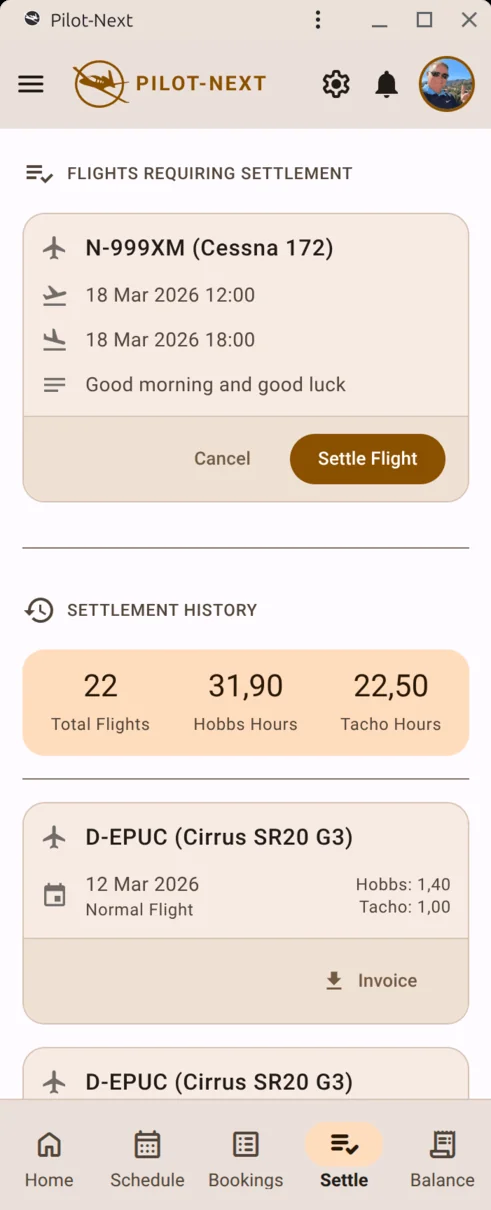
| Billing from the booking | Rates can be charged per hour or per booking. The flown hours are priced, invoiced and booked to the pilot’s account balance. |
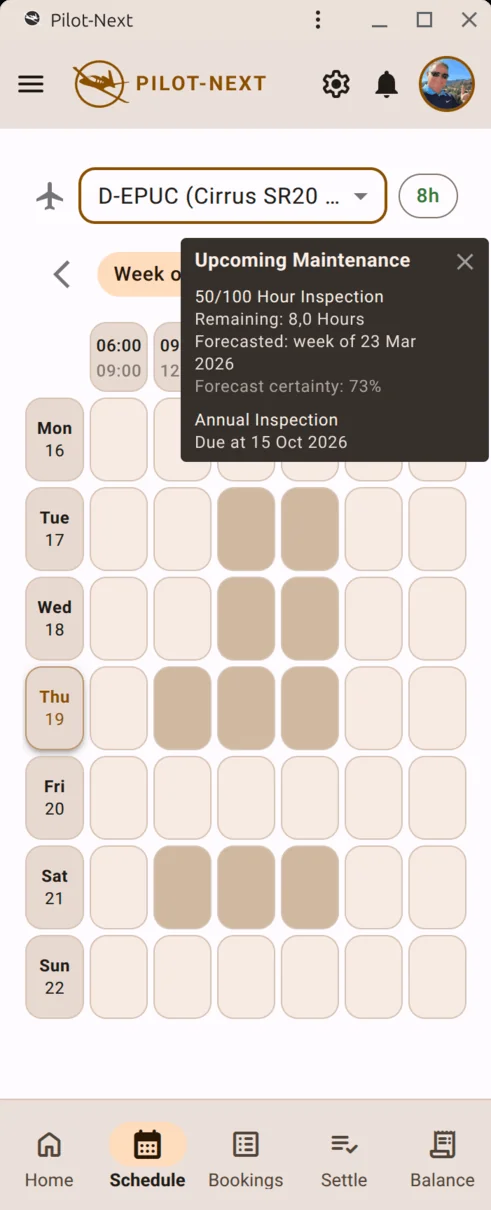
| Maintenance in view | Maintenance plans forecast when the next 100-hour, annual or recurring inspection falls due, in hours and in days. |
| AI assistants | A remote MCP server lets Claude or another MCP-aware assistant find a free slot, book the aircraft or close out the flight with your own permissions. |
The assistant integration has its own page: all 17 MCP tools and how to connect them. Which meter to bill on is a question in itself — Hobbs vs Tacho: what counts. Which inspections a club aircraft has to track, and how hour and calendar limits combine, is on aircraft maintenance tracking; invoicing in euros with VAT for a European club on flying club software for Europe.
What’s a good aircraft scheduling app for a flying club?
A good aircraft scheduling app for a flying club stops double bookings, puts each booking in the pilot’s own calendar and, for most clubs, books an instructor with the aircraft, refuses a pilot whose medical or checkout has lapsed and keeps a grounded aircraft off the schedule. Of the 35 other scheduling platforms we checked on their own websites on 29 September 2026 (five on 8 October 2026, Resyrv on 11 October 2026, AerScheduler on 14 October 2026, TachTab on 17 October 2026, Kai, FlightWay, Sky Duty and Sky Schedule on 19 October 2026, apron:pilot and Nexus Flight Ops on 20 October 2026, FlightTyme and FlyLink on 29 October 2026), fifteen say they block bookings on a grounded or overdue aircraft (Flight Schedule Pro, Holdshort, Aviatize, Hobbstack, Flightnet, FlightBoard, Avibase, Squawkd, Flight Suite HQ, Resyrv, AerScheduler, FlightWay, Sky Schedule, Nexus Flight Ops and FlightTyme), fifteen check pilot qualifications before a booking (FlightCircle, Holdshort, Aviatize, Schedule Master, AircraftClubs, Flightnet, Chronos, Avibase, Flight Suite HQ, SkyFSBookings, Resyrv, AerScheduler, FlightWay, apron:pilot and Nexus Flight Ops) and twelve offer a native app (Flight Schedule Pro, Holdshort, Aviatize, Coflyt, FlyClub, FLYLOG.io, Flight Suite HQ, Resyrv, AerScheduler, Kai, Sky Duty and Sky Schedule). Read again on 7 October 2026 (the last five on 8 October 2026), 17 let a club set booking limits — a maximum booking length, a cap on open bookings, how far ahead a member may book, or no booking with an unpaid balance (FlightCircle, Flight Schedule Pro, Holdshort, Aviatize, Schedule Master, PilotSchedule, Hobbstack, Flightnet, FlightBoard, Centerline, Resyrv, AerScheduler, Kai, FlightWay, Sky Schedule, apron:pilot and Nexus Flight Ops).
Which one fits depends on what the club needs most. A club that trains students needs instructor scheduling and qualification checks; Holdshort, Aviatize, Flightnet, Avibase, Flight Suite HQ, Resyrv, AerScheduler and Nexus Flight Ops state all three of instructor scheduling, qualification checks and a maintenance block. A club where members pay for the hours they fly needs the logged Hobbs or Tacho time to become a charge without a spreadsheet in between; 25 of the 36 platforms say they do that (Pilot-Next, FlightCircle, Flight Schedule Pro, Aviatize, Schedule Master, Coflyt, ForeFlight Scheduler, Hobbstack, Flightnet, FLYLOG.io, Chronos, AeroBooker, FlightBoard, Avibase, Flight Suite HQ, Centerline, Resyrv, AerScheduler, TachTab, Kai, FlightWay, Sky Schedule, apron:pilot, Nexus Flight Ops and FlightTyme).
Pilot-Next is built for the second kind of club. It blocks double bookings, enforces the booking limits a club sets (length, open bookings, days ahead, minimum balance), sends the pilot a calendar invite for every confirmed booking unless they switched invites off, and turns the hours logged against a booking into an invoice and a debit on the pilot’s account balance. It does not schedule instructors and does not check medicals. An administrator can ground an aircraft for a period, with a reason: members cannot book it in that period, and bookings in it that have not started yet are cancelled and their pilots told why. In the app an overdue inspection does not ground the aircraft by itself — the schedule shows the hours or days left in amber or red; only a booking made through an AI assistant is refused when its estimated flight hours exceed the hours left on an hour-based inspection. It is a web app you add to your home screen, not an app-store download.
What 36 scheduling platforms say they do for a flying club, read on each vendor's own website on 29 September 2026; the booking-limits column on 7 October 2026; five platforms on 8 October 2026, Resyrv on 11 October 2026, AerScheduler on 14 October 2026, TachTab on 17 October 2026 Kai, FlightWay, Sky Duty and Sky Schedule on 19 October 2026 apron:pilot and Nexus Flight Ops on 20 October 2026, and FlightTyme and FlyLink on 29 October 2026.
| Platform | Native iOS/Android app | Bookings in your own calendar | Instructor booked with the aircraft | Blocks a grounded aircraft | Booking limits a club can set | Checks pilot currency before booking | Bills the logged hours |
|---|---|---|---|---|---|---|---|
| Pilot-Next | No — installable web app (PWA), no app-store download | Yes — calendar invite per confirmed booking, updated and cancelled with it | No | Partly — an administrator grounds it for a period: member bookings are refused, open ones cancelled; not automatic when an inspection is overdue | Yes — maximum length, open bookings per member, days ahead, minimum balance to book | No | Yes — Hobbs/Tacho priced, invoiced and booked to the pilot’s balance |
| FlightCircle | Not stated — its FAQ says to add the web app to the home screen | Yes — Google Calendar sync and an ICS feed | Yes — instructor work schedules | Not stated — expired reminders and open squawks block dispatch | Yes — “More Than x Total Future Reservations”, “a maximum time a user can reserve the plane”, minimum credit to schedule | Yes — checkout, medical and flight-review restrictions | Yes — checked-in flight charged to the user’s ledger |
| Flight Schedule Pro | Yes — iPhone and iPad | Yes — send reservations to the iOS calendar | Yes | Yes — “automatically restrict reservations until service is complete” | Yes — “restrict scheduling for pilots with outstanding balances” | Not stated | Yes — invoice when the flight is checked in |
| Holdshort | Yes — iOS and Android | Not stated | Yes — instructor availability | Yes — optional: disables reservations once an inspection is overdue | Yes — “Maximum Event Length” and a maximum number of future events | Yes — ratings, endorsements, flight review, medical | Not stated — invoice per reservation (billing module in beta) |
| Aviatize | Yes — iOS and Android (Aviatize Connect) | Yes — calendar invites | Yes | Yes — grounding squawks or open ADs block the booking | Yes — booking horizon, “Cap the number of bookings a member can hold at once”, minimum and maximum durations | Yes — instructor qualifications and document validity | Yes — Hobbs time becomes an invoice line |
| Schedule Master | Not stated — “on a browser or mobile phone” | Yes — reservations “may be synced with personal calendars” | Yes | Not stated — maintenance due dates and notifications | Yes — “Automatically suspend scheduling for users who fall behind in payments” | Yes — qualifications and checkouts | Yes — usage billing at the end of a reservation |
| AircraftClubs | Not stated — a mobile web version | Yes — calendar invitations | Yes — instructors as schedulable resources | Not stated — an administrator places a maintenance reservation | Not stated | Yes — medical, biennial and club review | Not stated — Tach and Hobbs entry, QuickBooks integration |
| Coflyt | Yes — iOS and Android | Not stated | Not stated | Not stated — an overdue inspection can ground the aircraft | Not stated | Not stated | Yes — hourly rate on Tach or Hobbs, charges created automatically (Plus) |
| FlyClub | Yes — iOS and Android | Yes — ICS feed (Plus and Advanced) | Not stated | Not stated — status shown before every flight | Not stated | Not stated — expiry reminders | Not stated |
| Wingmint | No — “mobile-first web + installable PWA” | Yes — iCal export | Yes | Not stated — squawks auto-ground the aircraft | Not stated | Not stated | Not stated — monthly statements, dues by ACH |
| PilotSchedule | No — “no app store download” | Not stated | Yes | Not stated — resources blocked for maintenance by hand | Yes — “Maximum reservation length”, “Maximum future hours per pilot”, “Maximum days in advance” | Not stated | Not stated |
| ForeFlight Scheduler | Not stated — runs in the browser on phone, tablet or computer | Not stated | Yes — aircraft, simulators and instructors on one schedule | Not stated — upcoming inspection limits shown in the schedule | Not stated | Not stated | Yes — itemized invoices from completed reservations (early access, no price published) |
| Hobbstack | No — “no app-store download”; add the web app to the home screen | Yes — iCal subscription for Apple, Google and other calendars | Yes — aircraft, instructors and rooms on one view | Yes — a grounding squawk cancels future reservations | Yes — “block their next booking, once their balance passes a threshold you set” | Partly — endorsements enforced at booking; medicals tracked | Yes — charges calculated from Hobbs time and rates |
| Flightnet | Partly — third-party iPhone app (iFlightnet); mobile web access | Yes — reservations in Outlook, iPhone or Google Calendar; iCal | Yes — separate times for aircraft, pilot and instructor | Yes — maintenance reservation cancels bookings with notification | Yes — maximum hours, in general and per user; booking only a set number of days ahead | Yes — reservation only with valid rating, check flight and medical | Yes — flight billing is a paid option |
| FLYLOG.io | Yes — web, iOS and Android | Yes — booking e-mails that “land in personal calendars” | Yes — members book only when an instructor is free | Not stated — planned maintenance visible to all members | Not stated | Not stated — reminders before licences and medicals expire | Yes — flight costs calculated from recorded flights, one-click invoicing |
| Chronos | No — “no software to install”; runs in the browser | Yes — Google Calendar integration | Yes — aircraft and instructors as resources; trips of several reservations | Partly — maintenance reservations block the calendar through its Quantum MX integration | Not stated | Yes — expired solo endorsements and make/model checkouts | Yes — Hobbs and tach logged after the flight, customer account billed |
| AeroBooker | Not stated — “mobile and desktop compatible” | Not stated | Not stated | Not stated — maintenance scheduled with alerts | Not stated | Not stated — licence, rating and medical expiry tracked | Yes — flight costs from tach, Hobbs or flight time |
| FlightBoard | No — offered to US users only; in the browser, “nothing to install” | Not stated | Not stated — instructors are members | Yes — “no booking during scheduled maintenance or on a grounded aircraft” | Yes — “Minimum and maximum booking length”, “How far ahead members can book” | Partly — aircraft checkout required to reserve; medical and flight review reminders | Yes — aircraft rate, wet, dry or per tach hour, applied to the time flown |
| Avibase | Not stated | Not stated — duty roster as a calendar subscription | Yes — instructor on the booking; instructor availability | Yes — an AOG defect locks the aircraft for new bookings | Not stated | Yes — required licences; expired licences always block; 90-day rule | Yes — Hobbs minutes × rate, invoice and balance per pilot |
| Squawkd | No — progressive web app, no App Store or Google Play app | Yes — calendar ICS sync (Pro) | Not stated | Yes — “maintenance blocks the calendar automatically” | Not stated | Not stated — licence, medical and currency on the pre-flight screen | Partly — Hobbs-weighted cost split and a balance per co-owner |
| Flight Suite HQ | Yes — iPhone and Android apps from the App Store and Google Play | Yes — iCal feeds members subscribe to in Google, Apple or Outlook (its flying-club page) | Yes — aircraft, instructors and students on one calendar | Yes — “an overdue inspection removes the aircraft from the schedule until it is signed off” | Not stated | Yes — every booking checked against “the pilot’s currency before it is saved” | Yes — the flight is priced from your rates and invoiced at check-in |
| Centerline | No — “It runs in the browser, with nothing to install” | Partly — an email with a calendar invite when a backup booking is promoted, and to the assigned instructor | Yes — “Assign a CFI to any reservation” | Partly — a maintenance block an admin schedules bumps overlapping bookings; a grounding squawk only warns | Yes — “maximum reservations per member, maximum hours per member, and maximum reservation length” | Partly — checkout per aircraft enforced; medical and flight review dates tracked | Yes — each aircraft wet or dry, “billed off Hobbs or tach” |
| SkyFSBookings | Not stated — runs in a browser, “no install” (its flying-club page) | Not stated | Yes — instructor assignment by who is working that day | Not stated | Not stated — “Members request slots against rules you set”; the rules are not listed | Yes — “Blocks bookings when a pilot is out of currency” | Not stated |
| flyWilco | No — “No install, no app store”; works in the browser | Not stated | Yes — aircraft and instructor clashes caught live | Not stated | Not stated | Partly — medical and rating warnings shown to the instructor who approves | Not stated — membership pricing tiers; invoicing flights not stated |
| AirportSync | No — installable web app (“Install as an App”) | Not stated | Yes — schedule for instructors, aircraft and classrooms | Not stated — maintenance tracking listed | Not stated | Not stated — certifications and medicals tracked | Not stated — billing and invoicing modules; what they bill from is not stated |
| Resyrv | Yes — “a native iOS app”; on other phones in the browser | Yes — a Google Calendar connection and an ICS feed for Apple Calendar and Outlook | Yes — “treats a dual flight as a single reservation and checks both resources” | Yes — “A grounded aircraft cannot be dispatched, and by default it cannot be booked either” | Yes — future reservations per member, reserved hours per month and the longest single reservation, per member tier | Yes — “bookings block for any pilot who falls out of currency”; a checkout gate per aircraft | Yes — “The moment a flight is returned, its charges land on the member’s ledger” |
| AerScheduler | Yes — “on the App Store and Google Play” | Yes — pushes reservations to Google Calendar; a private ICS link for Apple Calendar and Outlook | Yes — “Approved members pick an aircraft, an instructor when needed, and a time” | Yes — an overdue inspection grounds the aircraft; “Every booking type except maintenance is refused” | Yes — “Caps on booking length and bookings held”; “a minimum credit to self-book and a maximum they may owe” | Yes — “Currency checks run on every booking”: medicals, flight reviews, checkouts | Yes — “Auto-drafted itemized bills from Hobbs/tach close-out” |
| TachTab | No — “an installable web app … it’s not in the App Store” | Not stated — one shared calendar per aircraft inside the app | No — “If you need instructors, a syllabus, dispatch or maintenance blocks, pick one of them … ours does none of that” | No — no maintenance blocks, in the same sentence | Not stated — a minimum daily charge for a booking that spans more than one day | Not stated | Yes — “the booking and the invoice were never two separate records”; Hobbs or tach, wet or dry |
| Kai | Yes — “Kai’s apps for iPhone, iPad, Android and Mac”; the iPhone app is in the App Store | Yes — “iCal sync to Google Calendar, Apple Calendar or Outlook” | Not stated — student and instructor management only as a flight school module | Partly — an administrator grounds the aircraft for a maintenance item and overlapping new bookings are refused; “It never grounds the asset by itself — an admin still decides.” | Yes — “Maximum booking length (e.g. 8 hours)” · “Maximum lead time (e.g. no more than 90 days ahead)” | Not stated — licences and medicals per pilot “with expiry dates in view”; no check before booking stated | Yes — “Kai can automatically generate invoices from usage logs based on your billing rules.” |
| FlightWay | No — “A native iPhone and iPad app is in build … It will land in the App Store”; installs to the home screen today | Not stated | Not stated | Yes — “A squawk marked critical sets the aircraft unairworthy … it pulls the aeroplane out of the booking form and blocks check-out” | Yes — “Booking limits per member configurable” · “How far ahead members may book configurable” | Yes — “Currency and medical gating optional” | Yes — “A flight is charged when it is flown, at that aircraft’s rate.” |
| Sky Duty | Yes — “offline-first on iPhone and iPad”; App Store | Yes — “generates ICS calendar feeds so bookings show up in each member’s own calendar app” | Not stated | Not stated — inspection countdowns with a “due, overdue, and grounded view”; blocking a booking not stated | Not stated — conflict detection only | Not stated — currency tracked from logged flights; no check before booking stated | No — “it is not a dues-billing or member-payment system — it does not collect member dues or process club payments” |
| Sky Schedule | Yes — iPhone and iPad app “built natively for iOS”; App Store | Yes — members “add bookings to their own Google Calendar, which updates when a reservation changes” | Yes — “Pick the Instructor, the Customer, and the Aircraft.” | Yes — an overdue inspection blocks new bookings once the club turns on “Block overdue aircraft”; a grounding squawk alone does not | Yes — “Minimum notice to book and to cancel, a cap on open flights, and a minimum balance before booking.” | Partly — medicals, flight reviews and checkouts are flagged on the booking form; staff “can click Override and book anyway” | Yes — “drafts the invoice from the meter your club bills on: Hobbs, Tach … or scheduled time” |
| apron:pilot | No — “apron:pilot runs in the browser and is optimised for smartphones – no installation required” | Yes — “iCal & Google Calendar: All or your own bookings in your personal calendar” (Premium) | Not stated — a training module for DTOs is announced for 2027 | Not stated — defects with photos and a status (open, accepted, fixed) and a maintenance forecast (Premium); no booking block stated | Yes — “Requests with approval, lead time, maximum duration and count” (Premium) | Yes — “Rating check for every booking”; “From SEP(A) to medical: define what each aircraft requires.” | Yes — invoicing add-on: “Invoices are built from logbook entries”, “Counter-based rates, e.g. Hobbs” |
| Nexus Flight Ops | Not stated — “One schedule, on everyone’s phone”; no app store app named | Not stated | Yes — “Aircraft, instructors, simulators, and briefing rooms on a single timeline” (instructors on the Flight School plan) | Yes — “Grounding squawks hold dispatch until they are cleared” | Yes — “Booking windows and limits per reservation type, enforced automatically” (Club plan and up) | Yes — “Checkouts, medicals, and flight reviews on record, checked at booking”; each rule set “to warn or to block” | Yes — “Each owner’s flying posts to their own ledger at the rate you set” |
| FlightTyme | Not stated — “Works on any device” | Not stated | Partly — “A Resource is an aircraft or instructor that can be scheduled”; booking both together not stated | Yes — “Take aircraft OFFLINE for maintenance.” | Not stated — “Set which Aircraft each member is allowed to schedule.” | Not stated | Yes — “Flights are automatically invoiced to member accounts after dispatched back in from flying”; Hobbs and/or Tach at dispatch |
| FlyLink | Not stated | Not stated | Not stated | Not stated — “Maintenance / techlog”; a booking block is not mentioned | Not stated | Partly — “Recency / currency tracking” and licence and medical expiry dates (Club plan); a check at booking not stated | Not stated — “Basic billing” on every plan; what it bills is not stated |
“Not stated” means the vendor's site does not say — not that the feature is missing. “No” for another platform only where its own site says so; for Pilot-Next, where the application does not do it. Click a platform name for the site we read. How a club turns those logged hours into a charge — Hobbs or Tacho, wet or dry, prepaid account or invoice — is laid out in how a flying club should bill its pilots for flight time.
What booking rules do flying clubs set?
Of the 17 flying clubs whose rates we read, 9 publish booking rules on their public website (read 6 October 2026). The most common is a recent-flying or checkout requirement before a member may book or fly (6 clubs), then a limit on how long or how many bookings a member may hold (5) and a minimum number of hours charged per day away (5). Four clubs set cancellation or no-show rules, 2 let only members with a paid-up account book, and 2 limit how far ahead a member may book.
The rules are about sharing a small fleet fairly. Hokie Flying Club allows six bookings at a time and may charge one hour of flying for a no-show; Oregon State Flying Club allows seven days away and one full weekend a month, and charges two hours per 24 hours away from base; Westchester Flying Club voids a reservation that is not in use after the first hour and fines a first breach of its reservation rules $50. Mitchell, Westchester and the FAA Flying Club say they have no (or generally no) daily minimum. Six name the system they book in: Schedule Master (two), AircraftClubs, Flight Circle, Vereinsflieger and Aeroplus.
Booking rules published by 17 flying clubs
- Limit on booking length or open bookings5 of 17
- How far ahead a member may book2 of 17
- Cancellation notice or no-show charge4 of 17
- Minimum hours for a day or trip away5 of 17 · 3 say none
- Recent flying or checkout before booking6 of 17
- Account in credit to book or fly2 of 17
| Club | Published booking rules | Books in |
|---|---|---|
| TSS Flying ClubUSA |
| Books in: Not stated |
| Fox Flying ClubUSA |
| Books in: Schedule Master |
| Mitchell Flying ClubUSA |
| Books in: Not stated |
| FAA Flying ClubUSA |
| Books in: Not stated |
| Hokie Flying ClubUSA |
| Books in: AircraftClubs |
| Westchester Flying ClubUSA |
| Books in: Schedule Master |
| Oregon State Flying ClubUSA |
| Books in: Flight Circle |
| Southport and Merseyside Aero ClubUK |
| Books in: Not stated |
| KLM AeroclubNetherlands | None published | Books in: Aeroplus |
| Fliegerclub NürnbergGermany |
| Books in: Vereinsflieger |
The same rules at 22 clubs, rule by rule — how many open bookings, how many days away, what a no-show costs — are in flying club booking rules: what 22 clubs set.
Which of these booking rules does Pilot-Next enforce?
Three of the six kinds, through four rules a club can switch on: a maximum booking length, a maximum number of open bookings per member, how many days ahead a member may book, and a minimum balance to book — set to 0, a member with a negative balance cannot make a new booking. Every rule is optional and applies when a member books for himself, in the app or through an AI assistant; an administrator is not limited, for himself or on a member’s behalf. On top of that a confirmed booking can never overlap another on the same aircraft, and a club can make every member booking wait for an administrator’s approval. An administrator can also ground an aircraft for a period, with a reason: members cannot book it then, and bookings in that period that have not started yet are cancelled. Pilot-Next does not check currency and does not charge a daily minimum or a no-show by itself.
What happens when a member books
1. Approval
Club setting: Club requires approval of member bookings
The booking will be saved as pending, waiting for an administrator. Without this setting it is confirmed straight away.
2. Booking length
Club setting: At most 72 hours
Refused: “Your club allows a booking of at most 3 days.”
3. Days ahead
Club setting: At most 30 days ahead
Refused: “Your club allows booking at most 30 days ahead.”
4. Open bookings
Club setting: At most 3 per member
Refused: “Your club allows at most 3 open bookings per member. Cancel or fly one first.”
5. Balance
Club setting: Minimum balance 0
Refused: “Your club does not allow new bookings while your balance is negative. Top up your account first.”
6. Aircraft free
Refused: “The selected time slot overlaps with an existing confirmed booking.”
Checked against confirmed bookings for every new booking, in the same database transaction that saves it.
Booked — confirmed, or pending until an administrator approves it.
Book
A member picks a free slot. An overlap with another confirmed booking is refused, and so is a booking that breaks a limit the club has set.
Fly and settle
After landing the member enters the Hobbs or Tacho reading against the booking. One booking is settled once, however many legs were flown.


| Limit on booking length or open bookings | Enforced, if the club sets it: a maximum booking length in hours (168 = 7 days) and a maximum number of open bookings per member. |
|---|---|
| How far ahead a member may book | Enforced, if the club sets it: how many calendar days ahead a member may book. |
| Cancellation notice or no-show charge | Not enforced. A late-cancellation or no-show charge is a manual entry by an administrator on the member’s account. |
| Minimum hours for a day or trip away | Not enforced. A daily minimum is a manual charge, like any other fee. |
| Recent flying or checkout before booking | Not checked. Pilot-Next does not track licences, medicals or recent flights. |
| Account in credit to book or fly | Enforced, if the club sets it: a minimum balance to make a new booking — 0 means no new booking while the balance is negative, a negative amount is a credit limit. With reminders on, a member whose balance stays negative also gets an e-mail. |
Checked against the Pilot-Next application on 7 October 2026. A no-show or minimum charge goes on the member's account like any other fee — see what flying clubs charge besides flight time.
What hourly rate covers the cost of renting out an aircraft?
The hourly rate has to cover every hourly cost of the flight plus the fixed costs of the year, spread over the hours the aircraft flies. On the same model as our aircraft ownership cost calculator, a Cessna 172S that flies 100 hours a year needs about €278 ($273 at a US price level) per hour with fuel included, and €217 ($197 at a US price level) at 200 hours a year. Insurance and depreciation come on top, because both depend on what the aircraft is worth.
More hours, lower break-even rate
- 100 h/year€278/h = €150 + €128 (€12,796 ÷ 100 h)
- 200 h/year€217/h = €183 + €34 (€6,810 ÷ 200 h)
- 300 h/year€201/h = €178 + €23 (€6,810 ÷ 300 h)
Break-even rental rate per flight hour, fuel included, before insurance and depreciation. Europe in euros, United States in dollars.
| Aircraft | 100 h/year | 200 h/year | 300 h/year |
|---|---|---|---|
| Cessna 152 | €238 · $245 | €174 · $166 | €157 · $145 |
| Tecnam P2008 JC | €157 · $168 | €117 · $113 | €105 · $97 |
| Cessna 172S Skyhawk SP | €278 · $273 | €217 · $197 | €201 · $177 |
| Piper PA-28-161 Warrior | €258 · $258 | €196 · $182 | €180 · $162 |
| Robin DR400/140B | €266 · $264 | €205 · $188 | €189 · $168 |
| Diamond DA40 XLT (Lycoming) | €283 · $280 | €215 · $198 | €197 · $175 |
Each rate adds up fuel, oil, maintenance and the engine and propeller overhaul reserves per hour, plus hangarage, the annual inspection, subscriptions and administration spread over the hours flown. Depreciation and insurance are left out because both follow what one particular aircraft is worth and how it is insured — add your own premium in the calculator. Data last updated 2026-10-27. Click a type to open it in the aircraft ownership cost calculator, switch rental on, and enter your own rate, hours and insurance to see the break-even point for your aircraft.
The more hours the aircraft flies, the lower the rate it needs: the fixed costs are shared over more hours. That is why the hours logged after each rental matter as much as the rate. In Pilot-Next the renter logs Hobbs or Tacho time against the booking, and the flight is priced at your rate, invoiced and booked to the renter's account. How a prepaid renter account and a minimum balance to book work, and which rental platforms do what: aircraft rental software.
How much does Pilot-Next cost?
Pilot-Next has four plans per company. SOLO is free forever for 1 aircraft and 1 pilot. BASIC is €9 a month billed annually for 1 aircraft and 5 pilots, PRO is €18 a month for 2 aircraft and 10 pilots, and ULTRA is €45 a month for unlimited aircraft and pilots.
SOLO
Free
forever
1 aircraft · 1 pilot
Start FreeBASIC
€9
per month (billed annually)
1 aircraft · 5 pilots
Choose BASICPRO
€18
per month (billed annually)
2 aircraft · 10 pilots
Choose PROULTRA
€45
per month (billed annually)
Unlimited aircraft and pilots
Choose ULTRA
Every plan has every feature; the plans differ only in the number of aircraft and pilots. Every account starts on SOLO, free and without a credit card; a paid plan is chosen in the app after sign-up.
More questions
Can I use Pilot-Next to rent out my aircraft?
Yes. Pilot-Next handles aircraft rental to other pilots: you set a rate per hour or per booking, the renter books the aircraft, logs Hobbs or Tacho time after the flight, and Pilot-Next prices the flight, creates the invoice and updates the renter’s account balance.
Do I need a credit card to start?
No. The SOLO plan is created with an email address and asks for no payment details. You only enter payment details when you upgrade to a paid plan.
Running a club rather than a single aircraft? See how 12 flying club management platforms compare on price and features, or start with the Pilot-Next platform overview.