Introducing MCP: talk to Pilot-Next from Claude
April 27, 2026 · Chris van Eijk
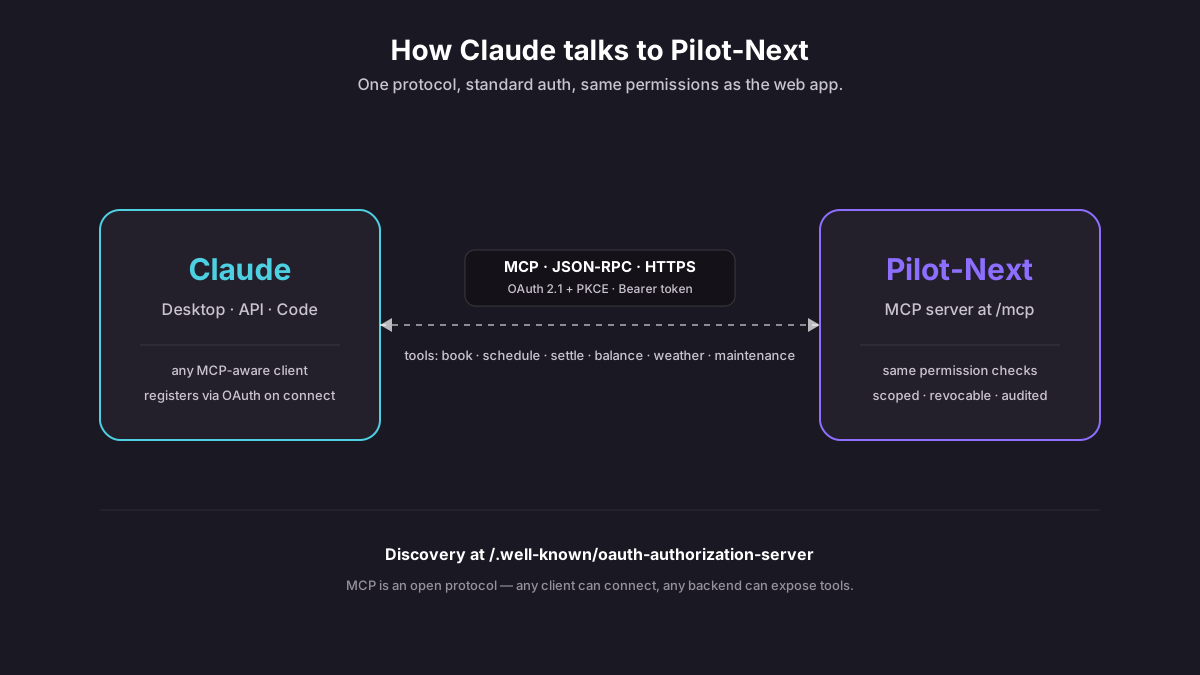
Pilot-Next now speaks MCP. If you use Claude — or another MCP-aware assistant — you can connect it to your Pilot-Next account and ask natural-language questions about bookings, balance, and aircraft availability, or act on them. Here's what that means in practice.
What is MCP?
MCP stands for Model Context Protocol. It's an open standard, originally published by Anthropic, for connecting AI assistants to external data sources and tools.
Before MCP, if you wanted an assistant to access your calendar or a company database, someone had to build a custom integration for every combination of assistant and data source. MCP replaces that with a single, consistent protocol — any MCP-aware assistant can talk to any MCP-aware server.
It's HTTP-based, handles auth cleanly (OAuth 2.1 with PKCE, Bearer tokens), and standardizes how tools are described and invoked. Think of it as REST for AI agents, normalized.
What Pilot-Next exposes
Our MCP server lives at /mcp on the Pilot-Next backend and exposes an aviation-specific tool set:
get_my_bookings— list upcoming and recent bookings.get_my_balance— current account balance.find_available_slots— "when is the Cessna free next week?"get_aircraft_availability— real-time availability for a specific aircraft.get_aircraft_hours— current Hobbs/Tacho on the airframe.create_booking— reserve an aircraft.cancel_booking— release a window.estimate_flight_cost— pre-flight cost estimate based on the aircraft's rate.get_unsettled_bookings— flights that still need to be closed out.preview_settlement/settle_booking— close out a flight end-to-end.get_booking_settlement_info— the recorded start readings and the available manual rates (landing fees and other extras) for a flight you are about to settle.get_flight_statistics— monthly / yearly aggregate view.get_pilot_activity— activity summary for a pilot.get_weather— METAR/TAF for any station.get_maintenance_forecast— when is the next 100-hour or annual due?get_dispatch_context_and_time— current time, timezone, and dispatch context.
Each tool runs as the signed-in user, inside their own club. A pilot changes only their own bookings and sees only their own balance; like the schedule in the app, the assistant shows who has booked an aircraft. An admin can additionally cancel another member's booking.
For how this server was built on top of an existing SaaS, see the technical write-up on Now-Next: An MCP server for an existing SaaS.
What it looks like
Connect Claude Desktop to your Pilot-Next account (one-time OAuth flow). Then:
You: "When's the Cessna free for a 3-hour block next Friday morning?"
Claude: "Aircraft N12345 is available 08:00–11:30 and 13:00–16:30 on Friday May 1. Would you like me to book one?"
Or, after a flight:
You: "I just flew the Cessna, 2834.2 to 2839.8 Hobbs. Close it out."
Claude: "That's 5.6 hours at €180/hr → €1,008. Settlement preview checks out. Shall I settle it?"
It's not magic — the assistant calls tools, reads the results, and asks for confirmation before destructive actions. But it's a lot faster than tapping through the app on your phone after landing.
How the auth works
Because MCP sits in front of a production aviation system, the auth can't be hand-wavy. Pilot-Next implements the full MCP OAuth 2.1 profile:
- Dynamic client registration (RFC 7591) — Claude Desktop registers itself on first connect. No static client IDs to distribute.
- PKCE on the authorization code flow — no shared client secrets.
- Bearer token validation on every MCP request — independent from the web app's JWT.
- Discovery metadata at
/.well-known/oauth-authorization-serverand/.well-known/oauth-protected-resource— standardized, so any MCP client can find us without configuration.
Tokens are scoped and revocable. If you disconnect Claude from your account, the token is dead immediately.
Connecting Claude Desktop
- Open Claude Desktop settings → Connectors.
- Add the Pilot-Next MCP endpoint as a custom server.
- Sign in to Pilot-Next in the browser tab that opens.
- Approve the scopes Claude asks for.
- You're connected.
From there, any conversation with Claude can reach your Pilot-Next data.
Why we built this
Aviation is one of those domains where the data you need is always just over there — in your club's booking system, in ForeFlight, in SkyVector, in the METAR feed. Asking an assistant to pull it together and act on it is a genuine workflow improvement.
It also keeps us honest about APIs. A clean MCP surface needs a clean HTTP surface underneath. Bookings made through Claude go through the same booking service, club rules and audit trail as the web app. Having a second consumer — an LLM — forces the design to be tighter, not messier.
Open protocol, open hands
MCP is open. The tools we expose are documented. If you're building on top of Pilot-Next — a voice assistant in your cockpit, a Slack bot for your syndicate, a spreadsheet macro that settles at month-end — you can use the same MCP endpoint we do. Get in touch if you ship something interesting.